
In this article, we will share the detailed steps on how you can download ChromeDriver – including the latest release (eg. ChromeDriver 147, 146, 145 or 144) as well as some previous versions as well. We’ll walk you through step-by-step instructions for Windows, macOS, and Linux, so you can download the correct driver for your operating […]
Run Playwright Tests in VS Code
Welcome to this new article in our Playwright Testing Tutorial. In the previous article, we covered how to use test.describe() to group Playwright tests and ran the test using command line. Although, running the tests from CLI is the most common and CI-friendly approach, it’s not always the most convenient option – especially when we […]
First Selenium test script to launch Chrome browser
In the previous article of this Selenium WebDriver tutorial series, you created a new Selenium project in Eclipse and added all the required Selenium JAR files. At this stage, your basic setup is complete. Now it’s time to validate that setup. Before we move into advanced topics like Maven, JUnit, or building a structured automation […]
Create new Selenium project in Eclipse
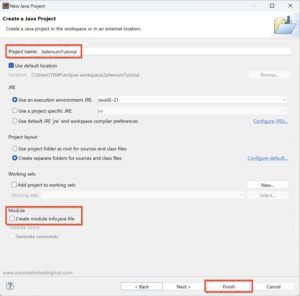
In our previous articles in this Selenium Tutorial series, you downloaded ChromeDriver and Selenium JAR files. Now it is time to create a Selenium project in Eclipse and configure it properly. In this article, I will show you step-by-step how to create a new Java project for Selenium in Eclipse and how to add all […]
How to Download Selenium WebDriver and JUnit jar files (Latest Version)

In this part of our Selenium WebDriver tutorial series, you will learn how to download the latest version of Selenium WebDriver and JUnit JAR files. These JAR files are required to configure Selenium with Java and start writing your first automation scripts. Before we begin the download process, let us quickly understand why we need […]
Eclipse IDE – Download and Install
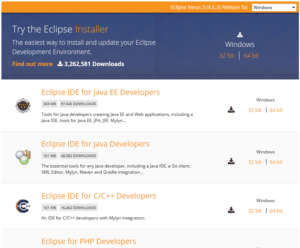
Eclipse IDE is a popular development environment used to write and manage Java-based development and test automation projects. Eclipse IDE that allows you to write your programs and test scripts in multiple programming languages such as Java, C, C++, PHP etc (with Java being the most popular one). As we are using Java as our […]